Android installment management software for mobile phone retailers in Pakistan.
IBS — Installment Business Solutions — locks, tracks and reminds, remotely, for the Android phones (Android 7.0 and above) your shop sells on installment, from your Client Dashboard and the Dealer App.
An illustration of the paid and overdue states — flip it to preview both.
Your customers' data, your business records, and your daily operations deserve a system that understands how installment retail actually works here — and keeps everything close to home.
IBS is built and operated in Pakistan. There's no need to hand your customers' names, payment records, and locations to a platform based outside the country.
Talk directly to the team that built the system — on WhatsApp, in your language, without routing through an overseas call centre.
No currency conversion, no international payment friction — pricing built around how Pakistani retailers actually pay. See how device-key pricing works.
Urdu lock-screen reminders, qist-based plans, and a dealer hierarchy that matches how Pakistani phone shops are actually structured — from day one, not bolted on later.
Supporting a Pakistani-built platform means your business grows on infrastructure that's accountable, reachable, and invested in Pakistan's retail sector — not just serving it from a distance.
Keep Pakistan's Data in PakistanEverything below runs from your Client Dashboard and the Dealer App, over the customer's normal mobile data. See the full features overview for details on each.
Freeze a device the moment an installment is missed. Release it as soon as the payment is recorded — no waiting for the customer to walk in.
See how device lock works →Restrict selected apps as a measured step before a full device lock — keep enforcement proportional for customers who are just a few days late.
Reduce calling access as a final step before full enforcement, for accounts that have gone quiet and stopped responding.
Track enrolled devices on live GPS — useful for recovery routing when a customer stops answering calls and messages.
More on GPS tracking →Automatic reminders before and after the due date, your own reminder or alarm alert, and an Urdu and English lock screen with your shop's contact numbers.
See payment reminders →Get notified when a protected device's SIM is changed, so you can act before the trail goes cold.
Read about SIM-change alerts →Factory reset, safe boot, USB debugging and removal of the IBS app are blocked on protected devices.
Provision a phone from the Dealer App over a USB-OTG cable or Wi-Fi, then activate it by scanning a QR code — from your own phone, with no computer needed.
How device enrollment works →Every plan, due date, payment and overdue account tracked automatically in your Client Dashboard.
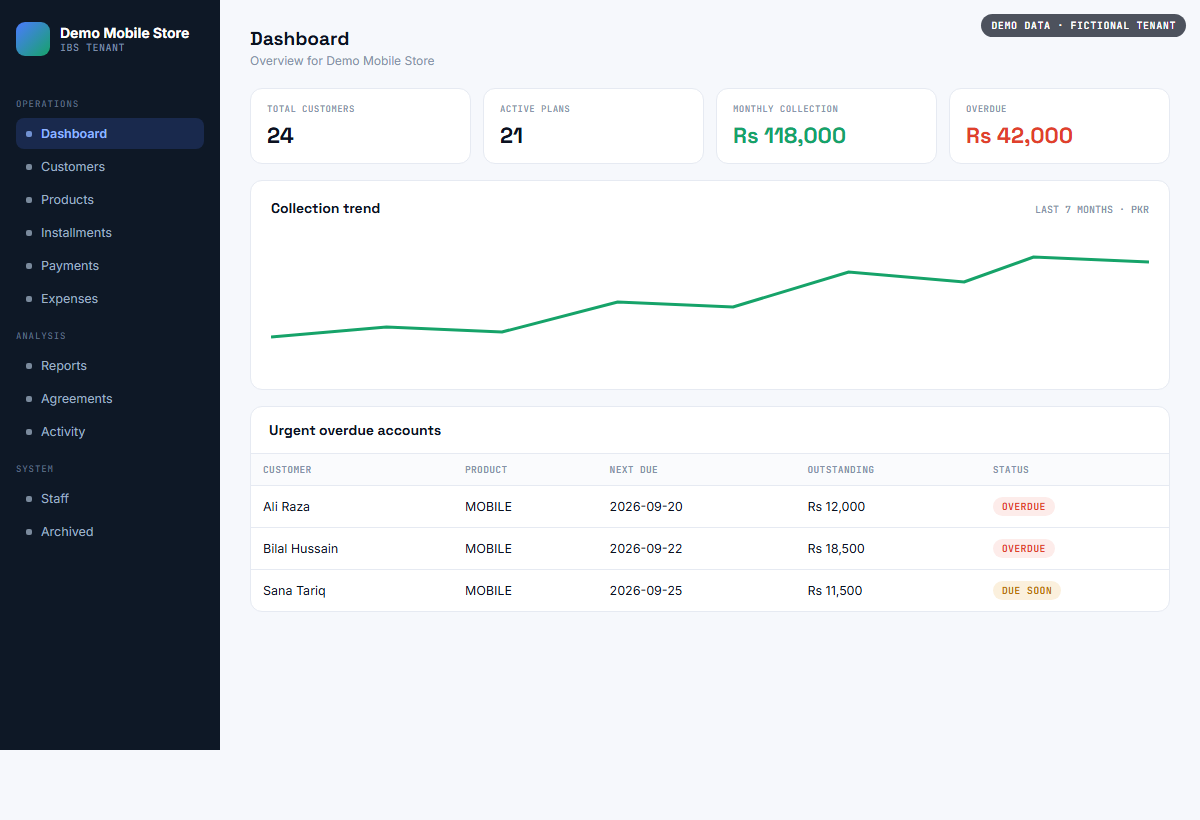
The Client Dashboard gives you a live view of every customer, plan and payment — the same screen you'll use every day.
Total customers, active plans, monthly collection, and overdue accounts — updated in real time as your dealers work.
The same flow whether it's a brand-new sale today or a device you sold weeks ago that still needs protecting.
Provision the phone from the Dealer App over a USB-OTG cable or Wi-Fi, then activate it with a QR code. The device is registered to your shop and protection is active before the customer leaves the counter.
Enter the price, down payment and number of months in the Dealer App. Due dates, reminders and the lock screen message are generated automatically.
Track every device, mark payments, and lock or unlock instantly from your Client Dashboard — across your whole business, from one screen.
IBS mirrors the structure most phone-finance businesses already use — you don't have to change how you work to adopt it.
Customers, active plans, collections, overdue accounts and reports — everything you need to run the business from a browser.
Enroll phones, set installment plans, collect payments and lock or unlock devices — built for the person behind the counter.
Explore the Dealer App →The phone works normally while payments are current — enforcement only activates when an installment is missed.
Pick the option that fits your business. Each one has its own page with details, prices and an application form. Questions? Read the FAQ or talk to us on WhatsApp.
Sell phones on installment, track every payment, and lock, locate and protect financed phones remotely.
See plans and apply → For other installment businessesCustomers, installment plans, payments and reports for installment businesses that do not sell mobiles. No phone lock. Starts with a free trial.
See plans and apply → For partnersBuy device keys in bulk, sign up and serve your own dealers, and share your own referral code.
See packages and apply →Tell us how many devices you're financing right now — we'll set up your dealer account and walk you through your first enrollment on a call. New here? Read more about IBS first.
 IBS Solutions